Google Home starter kit
A Matter hub, two plugs, three bulbs and two door sensors: a first Google Home shopping list, with the optional thermostat, doorbell and lock, and what to check before you buy.
As an Amazon Associate we earn from qualifying purchases. Product links on this page are affiliate links: buying through them costs you nothing extra and does not change what we recommend.

Amazon Echo Show 8
Best for: Kitchens and entryways where seeing a camera feed or a list helps.
- Screen shows doorbell and camera feeds
- Touch controls for people who prefer not to use voice
- Camera and microphones need privacy settings checked
- Bigger footprint than a speaker
Name, photo and listed features checked on Amazon.com on November 14, 2026. We have not tested it; see how we choose.
Before you buy
Before you buy
- Pick a hub that fits your devices. All Google Matter hubs handle Wi-Fi devices. Only some include a Thread border router. Check Google’s “Nest devices with Matter” article. See Google Home and Matter: which devices are hubs.
- Turn on IPv6 on your router if it is off. Google says setup may seem to work but control will eventually fail without it.
- Check the device type against Google’s supported list. Types that are not on it are “not officially supported”.
- Keep it local where you can. Matter devices work over your home network without routing each command through the cloud, per Google.
Presence automations
Google’s presence sensing can use phones, Wi-Fi and device activity to run Home and Away automations. Set it up after the basics and ask every adult to enable their own phone. Read Google Home presence sensing and automations.
What each piece does
| Piece | Network | Example automation |
|---|---|---|
| Hub | Wi-Fi, plus Thread on some models | Runs automations and voice commands |
| Matter plug | Wi-Fi or Thread | Lamp on at sunset |
| Matter bulb | Wi-Fi or Thread | Dim to 30% after 9 PM |
| Contact sensor | Thread or Wi-Fi | Door opens → entry light on |
Core items
Google says a Matter hub is needed to set up, control and automate Matter devices. A display also shows cameras and controls on a screen.
What to look for: a Google speaker, display, TV streamer or router that Google lists as a Matter hub; Thread border router support if you plan to use Thread devices

Matter smart plugs × 2
The simplest first devices: lamps, fans (check the label) and seasonal lights. Matter lets you add them to other ecosystems later.
What to look for: Matter logo, 15 A / 1,800 W rating, plug-in unit type on Google’s list, energy monitoring if you want usage
Matter smart bulbs (E26) × 3
Use them in the living room and bedroom for schedules and voice control.
What to look for: Matter logo, E26 base, brightness and color temperature range that matches your old bulbs

Contact sensors for doors and windows × 2
Open/closed sensors trigger lights and alerts. Google’s Matter types include contact sensors.
What to look for: Matter over Thread or Wi-Fi, replaceable battery, a hub that supports the transport

Nice to have
Heating and cooling are usually the biggest energy cost, and Eco and away modes pair with presence sensing.
What to look for: 24 V compatibility with your system, Google Home support, C-wire or included adapter; see our C-wire guide
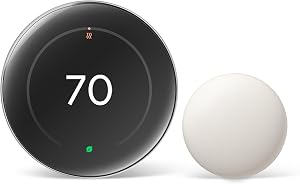
A familiar upgrade after the basics, with notifications on your display.
What to look for: Google Home support, wired or battery, subscription-free local options, a chime for the house

Google disables remote and voice unlock for locks that do not require a PIN, so a keypad lock fits voice use.
What to look for: Matter, PIN keypad, physical key backup, fit for your door
Step by step
- Set up the hub in the Google Home app and update it. Confirm that IPv6 is enabled on the router.
- Add the smart plugs: choose Add device, then Matter-enabled device, and scan the QR code.
- Add the bulbs and sensors, then assign them to rooms.
- Create two automations: one scheduled (lights at sunset), one sensor-based (door opens → hallway light).
- Test with your voice and the app, then try the app away from home Wi-Fi to confirm remote access.
Cheaper or upgraded versions
Skip sensors until you need automations.
Expanded version,240: the core kit plus a thermostat, a video doorbell, a PIN keypad lock, a Thread-capable hub in a second part of the house and additional sensors.
Frequently asked questions
Do I need a Nest display, or will a speaker do?
Google lists speakers, displays, a TV streamer and a router as Matter hubs. A display adds a screen, but any listed hub can coordinate Matter devices.
Are all Matter devices supported by Google Home?
No. Google supports a list of device types and says unlisted types are not officially supported. Check the list before you buy.
Do I need a subscription?
The core kit does not. Some camera and doorbell features may need a paid plan; check the camera maker and Google before you buy.
Will these devices work with Alexa and Apple Home too?
Matter devices can, through multi-admin. Add the device to one ecosystem, then share it from its settings.
Sources
- Google Nest Help — Nest devices with Matter
- Google Home Developers — Supported Matter device types (page updated Dec. 20, 2024)
- Google Nest Help — About presence sensing and how to manage your data
- Connectivity Standards Alliance — Matter
- Amazon.com listing: Amazon Echo Show 8, With Spatial Audio, Smart Home Hub, Designed for Alexa+, Charcoal (ASIN B0BLS3Y632), checked November 14, 2026
- Amazon.com listing: WiZ 60W A19 Tunable White LED Smart Bulb - Pack of 6 - E26 - Connects to Your Existing Wi- (ASIN B0B3347SYV), checked November 14, 2026
- Amazon.com listing: Eve Door & Window (Matter) – Smart Contact Sensor for Doors & Windows (ASIN B0BZSY26WP), checked November 14, 2026
- Amazon.com listing: Google Nest Learning Thermostat (4th gen) + Nest Temperature Sensor (2nd gen) - Silver (ASIN B0D5BGST5N), checked November 14, 2026
- Amazon.com listing: eufy Security Video Doorbell E340 (with HomeBase 3), 2K Full HD Dual Cameras & Head-to-Toe (ASIN B0CJWZCJ1H), checked November 14, 2026
Product names, photos and listed features were checked on the Amazon.com product pages on November 14, 2026. Prices and availability change; the retailer page is always the reference.
Related pages
 GuideHow to choose smart bulbsBase size, lumens, color temperature, Wi-Fi, Zigbee or Thread: the short checklist that decides which smart bulb works in your lamp, your fixture and…ComparisonSmart bulbs vs smart switches: cost, wiring and useSmart bulbs are plug-and-play and give color; smart switches keep the wall switch working and control any bulb. See the cost per room, wiring needs,…
 KitSmart home starter kit under $100A speaker, two smart plugs, two bulbs and one door sensor: a starter shopping list aimed at a small budget, with the reasons behind each item.
 GuideHow to install a smart light switch safelyA smart switch swap takes about 30 minutes when the box is simple. Follow the shutoff, test and labeling steps below, and know the signs that mean…
 ComparisonSmart display vs smart speaker: screen, camera and hubA speaker is cheaper and listens from any room. A display adds a screen, video calls and camera feeds. Compare the hub role, privacy controls and…KitSmart home kit under $300 for a first apartment or rentalSpeaker or display, plugs, bulbs, a battery doorbell or indoor camera and leak sensors: a renter-friendly starter list with no rewiring.