Smart home without monthly fees
Which cameras, doorbells and security systems work without a paid plan, what you lose without one and how local storage changes the math.
As an Amazon Associate we earn from qualifying purchases. Product links on this page are affiliate links: buying through them costs you nothing extra and does not change what we recommend.
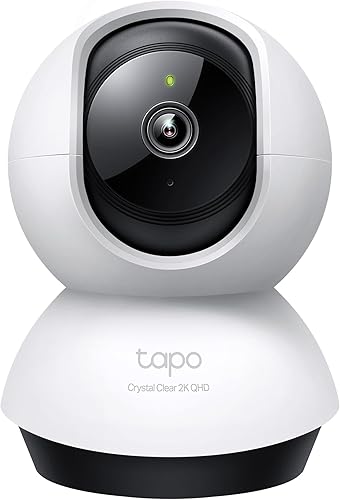
TP-Link Tapo C220 pan/tilt camera
Best for: Watching pets or a whole living room from one spot.
- One camera covers a whole room
- Local storage, no plan required to keep clips
- Indoor only
- microSD card sold separately
Name, photo and listed features checked on Amazon.com on November 14, 2026. We have not tested it; see how we choose.
Many smart devices are cheap to buy and expensive to own: video history, person detection or professional monitoring can sit behind a monthly plan. Over three to five years the subscription often costs more than the hardware.
Devices with local storage (microSD card, a home base station or a network video recorder) and platforms with local automations avoid most fees. Our pages list exactly which features usually stay free and which ones usually do not.
Where to start: count what a plan would cost you
Before choosing hardware, list which features you actually need and which ones usually require a plan. Live view and basic motion alerts are typically free; longer video history, person or package detection in the cloud and professional monitoring usually are not.
Then do the math over the years you will own the device. Plan prices change, so check the maker’s current page. Our camera storage calculator sizes the local storage you would need instead.
Compatibility checklist for fee-free devices
- Local storage. A microSD slot, a home base station or support for a network video recorder.
- Local control. Automations that run on a hub at home, not on a company server; see cloud vs local devices.
- Open standards. Matter, Zigbee or Z-Wave devices can move to another hub if a company changes its terms.
- Account requirements. Check whether the app works without a cloud account, or at least keeps working if the account lapses.
- A free hub you already own. Many speakers, displays and TVs act as hubs; our no-fee hub guide compares them.
Free features can move behind a plan later. Prefer devices whose core function works locally, so a pricing change costs you extras, not the basics.
What you give up without a plan
Going fee-free has trade-offs worth accepting knowingly. Footage stored on the camera’s card disappears if a thief takes the camera; hide the recorder or mirror clips to a drive indoors. Nobody calls the police for you, so alerts must reach phones that will be answered. Cellular backup for the alarm is usually part of paid monitoring. Some insurers discount premiums only for professionally monitored systems; check yours with our insurance discount guide.
Calculators 1
Kits 2
 KitNo-subscription home security kitA local hub, door and motion sensors, a siren and cameras that record to a card or drive: a home security setup with no monthly fee, with realistic…
 KitOutdoor PoE camera system kit for a houseFour wired cameras, a recorder, a hard drive and weatherproof cabling: the shopping list for a no-subscription outdoor camera system, with realistic…
Guides 3
 GuideVideo doorbell without a subscription: what worksYou can use a video doorbell with no monthly plan if you choose local storage. Here are what plans usually add, what they cost over three years and…
 GuideSecurity cameras with no monthly feeYou can run home security cameras with no subscription if you accept local storage: a microSD card, a base station or an NVR. Here is what you give…
 GuideWhich smart home hub works with no subscription?Core control should not cost a monthly fee. Pick a hub you already own, a local hub for Zigbee and Z-Wave, or Home Assistant, and know where fees…
Comparisons 4
 ComparisonSmart lock or keypad deadbolt without an appA Wi-Fi or Bluetooth smart lock gives remote control and logs; an electronic keypad deadbolt just opens with a code. Compare access, batteries…
 ComparisonDIY vs professionally monitored home security: costs and trade-offsA self-monitored system costs little per month and puts you in charge; professional monitoring adds a call center, a contract and sometimes an…
 ComparisonLocal or cloud storage for security camera video?Where the video goes decides what you pay each month, what survives a theft and who can see your footage. Compare microSD, hub and NVR storage with a…ComparisonCloud-connected vs local-control smart home devicesA cloud-connected device asks a company’s server to turn on your light; a local one talks to your hub or phone at home. Compare outages, privacy…
Frequently asked questions
Is a microSD card enough storage for a doorbell or camera?
Often, yes. With event-only recording, a 64 GB or 128 GB card can hold days to weeks of clips; continuous recording fills it much faster. Use a high-endurance card made for constant writing, and check the camera’s maximum supported size.
Sources
- Amazon.com listing: Tapo 2K+ Pan/Tilt Security Camera for Pet Camera, Baby Monitor, C220 (ASIN B0CWD7D41R), checked November 14, 2026
Product names, photos and listed features were checked on the Amazon.com product pages on November 14, 2026. Prices and availability change; the retailer page is always the reference.
 TP-Link Tapo C220 pan/tilt camera