HomeKit Secure Video: how it works, what it needs and its limits
HomeKit Secure Video stores camera clips in iCloud with end-to-end encryption after Apple devices at home analyze them. It needs a compatible camera, a home hub and a supported iCloud+ plan.
As an Amazon Associate we earn from qualifying purchases. Product links on this page are affiliate links: buying through them costs you nothing extra and does not change what we recommend.

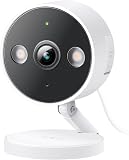
TP-Link Tapo C120
Best for: Renters and anyone who wants a small camera that can move between rooms.
- Small and inexpensive
- Magnetic base mounts without screws on metal surfaces
- Needs a cable to an outlet
- Fixed lens: no pan or tilt
Name, photo and listed features checked on Amazon.com on November 14, 2026. We have not tested it; see how we choose.
What HomeKit Secure Video is
HKSV is Apple’s camera recording system inside the Home app. Rather than sending footage to the camera maker’s cloud, the camera passes video to your hub; Apple says recordings are “analyzed privately on your Apple devices at home” and then “sent securely to iCloud through end-to-end encryption”. The hub does the analysis, the camera does the capture and iCloud does the storage. Apple’s privacy page adds that activity is “analyzed and encrypted by your Apple devices at home” before it is stored.
The three requirements
- A compatible camera. Apple’s accessories page marks supported cameras and doorbells with “Supports HomeKit Secure Video”. The feature is separate from basic Apple Home support: a camera that works in the Home app may not record with HKSV.
- A home hub. A HomePod or Apple TV that stays at home. See Do you need a home hub for Apple Home?
- A supported iCloud+ plan. Apple’s plan page ties the number of cameras to the storage tier.
How many cameras your plan covers
| iCloud+ plan | HKSV recording |
|---|---|
| 50 GB | One camera |
| 200 GB | Up to five cameras |
| 2 TB, 6 TB or 12 TB | Unlimited cameras |
Monthly prices differ by country and change, so use Apple’s plan page for current numbers. If you already pay for iCloud+ for photos and backups, HKSV may cost nothing extra; if not, it is a subscription on top of the camera price. Compare that with cameras that store footage on a memory card, and see security cameras without a monthly fee.
What the system does for you
- Lets you choose recording options for when you are home and when you are away; the options vary by camera and software version.
- Sends activity notifications to the Home app and keeps clips in iCloud that you can review there.
- Works with Home automations (turn on a light when the camera sees movement, for example), which also need the hub.
- Keeps analysis private: Apple states that video is analyzed on your Apple devices at home.
The exact detection options (people, animals, vehicles, packages, activity zones) depend on the camera maker and your software version, so read the camera’s listing before assuming a feature.
Limits and trade-offs
- The hub must stay online. If your HomePod or Apple TV is unplugged, off Wi-Fi or being updated, recording stops.
- The camera choice is narrower than the overall camera market. Check the label before buying.
- It records through your upload bandwidth. Several cameras at high resolution can use a lot of upstream capacity; see our camera storage calculator for estimates.
- No professional monitoring service. HKSV is a recording and notification system; it does not call a security company.
- Matter 1.5 adds a camera device type (Connectivity Standards Alliance, November 2025). Whether a Matter camera records into Apple Home with HKSV depends on Apple’s support, so check Apple’s documentation before buying one for that purpose.
Placement, privacy and local rules
Encrypted storage does not remove the legal and ethical limits of recording. Point cameras at your own property, not a neighbor’s windows, and tell guests when indoor cameras are on. The FTC advises basics such as strong unique passwords and updates for any internet-connected camera. See indoor camera privacy and security camera laws and neighbors.
A quick setup checklist
- Confirm your hub is online in the Home app.
- Add the camera by scanning its HomeKit code.
- Choose the recording option for when you are home and when you are away.
- Check that your iCloud+ plan covers the number of cameras.
- Walk past the camera and confirm a notification and a saved clip.
Products that match each need
Indoor camera for one room
What to look for: the “Supports HomeKit Secure Video” label, local setup via HomeKit code, a physical privacy shutter

Outdoor camera by the front door
What to look for: HomeKit Secure Video support, weather rating (IP65 or higher), wired or rechargeable power, night vision

Video doorbell on Apple Home
What to look for: HomeKit Secure Video support, existing wiring or battery option, a chime solution for your home

Frequently asked questions
Do I need iCloud+ for HomeKit Secure Video?
Yes. Apple says HomeKit Secure Video requires a supported iCloud+ plan, a compatible camera and a home hub.
How many cameras can I use with a 50 GB plan?
One. Apple lists one camera on 50 GB, up to five on 200 GB, and unlimited cameras on 2 TB, 6 TB or 12 TB plans.
Where is the video analyzed?
On your Apple devices at home, according to Apple’s privacy page. Recordings are then sent to iCloud with end-to-end encryption.
Does HomeKit Secure Video work without a home hub?
No. A HomePod or Apple TV acting as a home hub is required.
Sources
- Apple Support — iCloud+ plans and pricing
- Apple — Privacy features
- Apple — Home app accessories
- Apple Support — Set up a home hub to control your Apple Home accessories
- Federal Trade Commission — Using IP cameras safely
- Amazon.com listing: Tapo 2K+ Indoor/Outdoor Wired Security Camera, Baby Monitoring, C120 (ASIN B0CH45HPZT), checked November 14, 2026
- Amazon.com listing: WYZE Cam v4, 2.5K Indoor/Outdoor Security Camera, Color Night Vision (ASIN B0CWPB9CZV), checked November 14, 2026
- Amazon.com listing: eufy Security Video Doorbell E340 (with HomeBase 3), 2K Full HD Dual Cameras & Head-to-Toe (ASIN B0CJWZCJ1H), checked November 14, 2026
Product names, photos and listed features were checked on the Amazon.com product pages on November 14, 2026. Prices and availability change; the retailer page is always the reference.
Related pages
 GuideHOA rules for security cameras, video doorbells and outdoor smart devicesBefore you mount a camera or doorbell in an HOA community, read the CC&Rs, ask in writing and know what the FCC antenna rule does and does not cover.…
 CalculatorSecurity camera storage calculatorEnter your cameras, resolution, codec, recording mode and days of history to see how many gigabytes or terabytes you need, and what microSD card or…
 ComparisonPoE vs Wi-Fi security camerasPoE cameras get power and video over one Ethernet cable; Wi-Fi cameras need only a power source. Compare reliability, cabling, recorder, cost and…
 KitApple Home starter kitA home hub, two Matter plugs, two Matter bulbs and two Thread sensors: the shopping list for a first Apple Home setup, with prices and the optional…
 GuideSecurity cameras with no monthly feeYou can run home security cameras with no subscription if you accept local storage: a microSD card, a base station or an NVR. Here is what you give…
 ComparisonBattery vs wired security camerasBattery cameras mount anywhere in minutes but sleep between events and need recharging. Wired cameras record more and never run down, but need a…