Smart dimmer with LED bulbs: fixing flicker and buzz
LED bulbs flickering, buzzing or glowing on a smart dimmer is usually a mismatch of bulb, dimmer load or dimmer type. Work through the checks in order, from the cheapest fix to the last.
As an Amazon Associate we earn from qualifying purchases. Product links on this page are affiliate links: buying through them costs you nothing extra and does not change what we recommend.
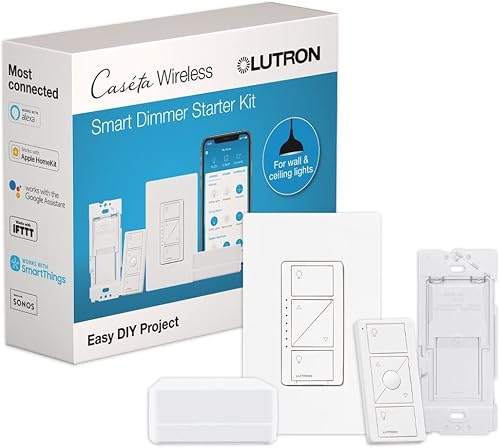
Lutron Caséta smart dimmer starter kit
Best for: Older homes without neutral wires in the switch box, and anyone who wants a smart switch that guests can use like a normal one.
- Caséta dimmers do not need a neutral wire, the usual blocker in older homes
- Very reliable because switches do not depend on Wi-Fi
- Needs the Lutron hub for app and voice control
- Check the dimmer’s LED load rating and compatible bulbs
Name, photo and listed features checked on Amazon.com on November 14, 2026. We have not tested it; see how we choose.
Why LEDs and dimmers do not always get along
Older dimmers were built for incandescent bulbs, which are simple resistors that dim smoothly at any load. LED bulbs contain a driver, a small power supply that reacts to how the dimmer chops the AC wave. If the driver and the dimmer disagree, you get flicker, buzzing, a visible “pop” at low brightness, or lights that will not go all the way off.
ENERGY STAR notes that not all certified bulbs are dimmable, so check the package. Its lamp specification requires dimmable lamps to be tested with at least five dimmers from at least two manufacturers, and the package must call out the controls that can be used. That means the compatibility statement on the box is meaningful, and so is the list on the dimmer maker’s site.
Work through these checks in order
- Confirm the bulb is dimmable. The package or base should say “dimmable”. A non-dimmable LED on a dimmer will flicker, buzz or fail early.
- Check the dimmer’s compatibility list. Look up your exact bulb model on the dimmer maker’s website, or find a bulb the maker lists. A listed pair removes most guesswork.
- Count the load. Add up the actual LED wattage on the circuit. Many dimmers need a minimum load: six 9 W bulbs make 54 W, which may satisfy one dimmer but not another. If you are below the minimum, add bulbs or choose a dimmer that supports low-wattage LED loads.
- Stay under the maximum. Dimmers list a lower maximum for LED loads than for incandescent ones. Read the label, not just the “600 W” on the box.
- Set the low-end trim. Many smart dimmers let you set the minimum brightness in the app or by a small dial. Raise it a few percent until the flicker stops at the bottom of the range.
- Use the same bulb everywhere on the circuit. Mixing brands or models in one fixture is a common source of uneven flicker. Replace all bulbs at once.
- Swap one bulb for a known dimmable model. If the flicker disappears, the original bulb was the problem.
- Change the dimmer. A dimmer rated for LED and designed for low loads fixes many cases. Turn off the breaker first, and if a neutral wire is missing, see smart switches without a neutral.
Symptoms and likely causes
| Symptom | Likely cause | First fix |
|---|---|---|
| Flicker only at low brightness | Load below minimum, or low-end trim too low | Raise the low-end trim; add a bulb to meet the minimum load |
| Flicker at every level | Non-dimmable bulb, or incompatible bulb and dimmer pair | Check the “dimmable” mark and the maker’s compatibility list |
| Hum or buzz from the dimmer | Dimmer chopping a high load, or cheap bulb driver | Try another bulb model; check the maximum LED load |
| Bulbs glow faintly when off | Dimmer without a neutral leaking current through the bulbs | Add the maker’s bypass or use a switch with a neutral connection |
| Bulbs will not go fully dim or flash on | Bulb does not respond to the dimmer’s dimming method | Pick bulbs on the dimmer’s compatibility list |
| Dropouts or random brightness changes | Smart bulb behind a dimmer | Remove the dimmer from the circuit |
Do not combine a dimmer with smart bulbs
A smart bulb has its own dimming and its own radio. A dimmer ahead of it interrupts that power, which can reduce brightness range, cause flicker and make the bulb drop offline. Replace the dimmer with a standard switch, or leave it fully on and tape a cover over it so nobody touches it. If you prefer a smart dimmer, use it with normal dimmable LED bulbs. See smart bulbs vs smart switches for how to decide.
When flicker is a wiring problem
Not all flicker is the bulb’s fault. Electrical Safety Foundation International lists dim or flickering lights, and switch plates or receptacle covers that are hot to the touch or discolored, among the signs that wiring needs a licensed electrician’s inspection. Consider it a wiring problem if:
- the flicker appears at full brightness with a known dimmable bulb,
- other lights in the house flicker when a large appliance starts,
- the wall plate feels warm, smells hot or looks discolored,
- you see buzzing from the wall that does not match the dimmer’s position.
In those cases, turn off the breaker for that circuit and call a licensed electrician. Follow local code and the dimmer maker’s instructions for any replacement, and see how to install a smart light switch safely for the method and the stop signs.
Buying bulbs that dim well
Look for bulbs sold as dimmable down to 1% or 5%, with a compatibility chart on the package or the maker’s site. ENERGY STAR certified bulbs are tested for the controls named on their packaging, which is a useful starting point. Buy a single pack first, test it on your dimmer, then buy the rest.
Products that match each need
Existing dimmer, standard LED bulbs
What to look for: bulbs listed on your dimmer maker’s compatibility chart, dimmable to 1% or 5%, same model in every socket
Replace an old dimmer, neutral wire present
What to look for: LED-rated smart dimmer, low minimum load, adjustable low-end trim, Matter or Zigbee or Wi-Fi 2.4 GHz
No neutral wire, low LED load
What to look for: dimmer designed for no-neutral boxes, stated minimum load, bypass included or available
Frequently asked questions
Why do my LED bulbs flicker on a dimmer?
Common causes are a bulb that is not dimmable, a total load below the dimmer’s minimum, or a bulb and dimmer pair that do not work together. Check the “dimmable” mark and the dimmer maker’s compatibility list first.
Why do LED bulbs buzz on a dimmer?
The dimmer chops the AC wave and the bulb’s driver can vibrate with it. Try a different bulb model, keep all bulbs the same, and check you are within the dimmer’s maximum load for LEDs.
Can I use a smart bulb on a dimmer switch?
It is better not to. The dimmer interrupts the power the smart bulb relies on, causing flicker or offline bulbs. Use a regular switch, or a smart dimmer with regular dimmable LEDs.
Is flickering light dangerous?
Usually it is just a mismatch of bulb and dimmer. But if lights flicker at full brightness or a switch plate is warm, treat it as a possible wiring fault, turn off the breaker and call a licensed electrician.
Sources
- ENERGY STAR — Light bulbs
- ENERGY STAR — Program requirements for lamps (light bulbs), Version 2.1 final specification
- Electrical Safety Foundation International — Home wiring safety tips
- Electrical Safety Foundation International — Do-it-yourself (DIY) electrical safety
- Amazon.com listing: Lutron Caseta Smart Dimmer Starter Kit w/ 1 OG Dimmer, Pico, Bracket & Hub (ASIN B07G5V6M6G), checked November 14, 2026
Product names, photos and listed features were checked on the Amazon.com product pages on November 14, 2026. Prices and availability change; the retailer page is always the reference.
Related pages
 GuideSmart switch without a neutral wireNo neutral wire in your switch box? Learn how to spot one, which switches work without it, what flicker to expect with LEDs and when smart bulbs or…GuideHow to install a smart light switch safelyA smart switch swap takes about 30 minutes when the box is simple. Follow the shutoff, test and labeling steps below, and know the signs that mean…
 GuideHow to choose smart bulbsBase size, lumens, color temperature, Wi-Fi, Zigbee or Thread: the short checklist that decides which smart bulb works in your lamp, your fixture and…ComparisonSmart bulbs vs smart switches: cost, wiring and useSmart bulbs are plug-and-play and give color; smart switches keep the wall switch working and control any bulb. See the cost per room, wiring needs,…CalculatorLED bulb savings calculatorCompare old incandescent bulbs with LED or smart LED bulbs: enter how many, the watts, hours per day and your rate to see the dollars saved per year,…
 GuideSmart 3-way switch: how it works and what to buyTwo switches control one light? A smart 3-way setup needs a main switch plus a companion, a wireless remote or smart bulbs. Learn how the wiring…