Smart switch without a neutral wire
No neutral wire in your switch box? Learn how to spot one, which switches work without it, what flicker to expect with LEDs and when smart bulbs or an electrician are the safer route.
As an Amazon Associate we earn from qualifying purchases. Product links on this page are affiliate links: buying through them costs you nothing extra and does not change what we recommend.
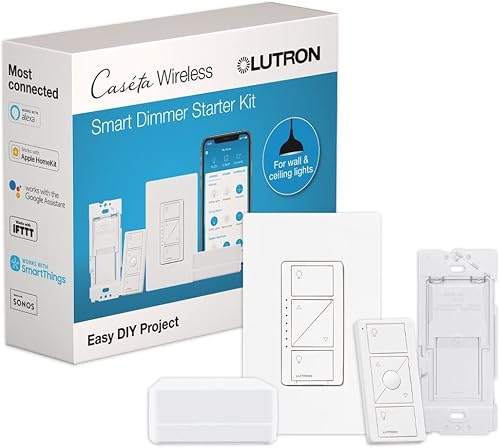
Lutron Caséta smart dimmer starter kit
Best for: Older homes without neutral wires in the switch box, and anyone who wants a smart switch that guests can use like a normal one.
- Caséta dimmers do not need a neutral wire, the usual blocker in older homes
- Very reliable because switches do not depend on Wi-Fi
- Needs the Lutron hub for app and voice control
- Check the dimmer’s LED load rating and compatible bulbs
Name, photo and listed features checked on Amazon.com on November 14, 2026. We have not tested it; see how we choose.
Why a smart switch wants a neutral
A basic switch only breaks the hot wire to the light. A smart switch has a radio and a small circuit that must stay powered even while the light is off. The neutral wire gives that circuit a return path to the electrical panel. Without a neutral, a smart switch has to take its power through the light itself, drawing a tiny current through the bulbs while they are off.
Many older homes wired the light fixture first and ran a two-wire cable down to the switch. This “switch loop” leaves no neutral in the switch box. Newer construction commonly includes one, but you cannot tell from the age of the house alone.
How to tell whether your box has a neutral
This is a visual check with the power off. Do not work in a box you have not shut off.
- Turn off the breaker for the light, then confirm the switch is dead using a non-contact voltage tester on each wire. Breaker labels are often wrong; test before you touch.
- Remove the wall plate and the two mounting screws and pull the switch out gently. Do not disconnect anything yet; take a clear photo.
- Look for a bundle of white wires twisted together under a wire nut at the back of the box, not connected to the switch. That is the neutral. You may also see a bare or green wire (ground) connected to the switch.
- Check any white wire attached to the switch. If a white wire connects to a switch terminal, it is probably part of a switch loop and carries power. Electricians sometimes mark it with black or red tape, but not always. Treat it as live, not as a neutral.
- Count the cables. One cable entering the box (two insulated wires plus ground) points to a switch loop. Two cables, one coming from the panel and one going to the light, often means the neutrals are bundled in the box.
If wires look cloth-insulated, brittle, scorched, or silver-colored aluminum instead of copper, stop. The Consumer Product Safety Commission has warned about overheating at connections where aluminum wiring meets switches and receptacles. Work on it should be done by a qualified electrician. And if the plate is warm, or lights flicker or dim on their own, ESFI lists those among signs that call for a licensed electrician to inspect the wiring.
Your options, with costs and limits
| Option | What it needs | Main limit |
|---|---|---|
| Switch that works with no neutral | A minimum load, often a few watts to 25 W or more, and single-pole wiring | LED bulbs can flicker, glow faintly when off or buzz; some models are not supported on 3-way circuits or fans |
| Smart bulbs plus a wireless switch or remote | Nothing in the wall; leave the old switch on | The wall switch stops working as a switch unless covered; see bulbs vs switches |
| Add a neutral | A path for a new cable, local code compliance, sometimes a permit | Walls may need to be opened |
| Bypass or load module at the fixture | Access to the fixture box | Involves working in the fixture; the maker’s diagram applies |
How a no-neutral switch behaves with LED bulbs
Two numbers matter on the box of a no-neutral switch: the minimum load and the maximum load. Many of these switches need a minimum of a few watts to work reliably. A single 9 W LED bulb can fall below that on some models, while six 9 W bulbs on a ceiling fixture will usually be fine. Add up the actual wattage of the bulbs, not the “60 W equivalent”.
- Flicker or a faint glow when off. The switch leaks a little current through the bulbs. Try bulbs from a single manufacturer, or add the bypass the maker supplies.
- Buzz or drop-outs. Often caused by cheap bulbs. Our guide to smart dimmers with LED bulbs covers the same fixes.
- Not compatible with every load. Motors (ceiling fans, bathroom fans), low-voltage lighting and some smart bulbs are commonly excluded. Read the compatibility list for the model you want.
Never install a smart switch on a fixture with a smart bulb in it unless you plan to leave the switch on permanently. The bulb needs steady power.
When not to do it yourself
- You are not sure which wire is line (power in) and which is load (to the light).
- The box is crowded, with several switches and many wires.
- Insulation is cracked, brittle or cloth-covered, or you see aluminum wiring.
- There is no ground wire, or the box is metal and not grounded.
- Your city requires a permit or a licensed professional for switch replacements. Rules vary by state and city; check local code.
ESFI recommends hiring a qualified, licensed electrician for any electrical work in the home, and if you do the work yourself, to turn off power at the breaker and test the wires to confirm it is off. When in doubt, hire a licensed electrician.
If you rent
Do not replace switches in a rental without your landlord’s written consent. Smart bulbs and a stick-on remote leave the walls untouched; see smart lighting without rewiring.
Products that match each need
Single-pole switch, no neutral, several LED bulbs
What to look for: explicit “no neutral” support, stated minimum load below your total bulb wattage, supported on LED, Matter or Zigbee or Wi-Fi 2.4 GHz
Want to avoid wall work
What to look for: battery wireless switch with adhesive mount, works with smart bulbs, Matter or Zigbee
Bulbs flicker on a no-neutral switch
What to look for: bypass or load module listed by the switch maker, wattage rating, clear wiring diagram
Ready to add a neutral
What to look for: standard smart switch with a neutral, load rating above your bulbs, Matter or Zigbee support, electrician installs
Frequently asked questions
Which wire is the neutral in a switch box?
Usually the bundle of white wires capped together at the back of the box and not connected to the switch. A white wire attached to the switch is typically a switch loop carrying power, and it is not a neutral.
Will a no-neutral smart switch work with LED bulbs?
Often yes, but it needs a minimum load, and LEDs are low-wattage. Some bulbs flicker or glow when off. Check the switch maker’s compatibility list and add up the actual LED wattage.
Can I use the ground wire as a neutral?
No. A ground wire is for fault current and safety, not for carrying normal load. Using it as a neutral is unsafe and against code.
Do I need an electrician to add a neutral?
Usually yes. Adding a neutral means running new cable and following local code. Hire a licensed electrician if you are unsure.
Sources
- Electrical Safety Foundation International — Do-it-yourself (DIY) electrical safety
- Electrical Safety Foundation International — Home wiring safety tips
- U.S. Consumer Product Safety Commission — Safety recommendations for aluminum wiring in homes
- U.S. Department of Energy, Energy Saver — LED lighting
- UL Solutions — Look for the UL safety mark before you buy
- Amazon.com listing: Lutron Caseta Smart Dimmer Starter Kit w/ 1 OG Dimmer, Pico, Bracket & Hub (ASIN B07G5V6M6G), checked November 14, 2026
Product names, photos and listed features were checked on the Amazon.com product pages on November 14, 2026. Prices and availability change; the retailer page is always the reference.
Related pages
 GuideHow to install a smart light switch safelyA smart switch swap takes about 30 minutes when the box is simple. Follow the shutoff, test and labeling steps below, and know the signs that mean…GuideSmart dimmer with LED bulbs: fixing flicker and buzzLED bulbs flickering, buzzing or glowing on a smart dimmer is usually a mismatch of bulb, dimmer load or dimmer type. Work through the checks in…
 ComparisonSmart bulbs vs smart switches: cost, wiring and useSmart bulbs are plug-and-play and give color; smart switches keep the wall switch working and control any bulb. See the cost per room, wiring needs,…
 GuideSmart 3-way switch: how it works and what to buyTwo switches control one light? A smart 3-way setup needs a main switch plus a companion, a wireless remote or smart bulbs. Learn how the wiring…GuideSmart lighting without rewiringRenting or avoiding wall work? Smart bulbs, plug-in lamps, adhesive remotes and LED strips give you voice control and schedules without touching a…CalculatorLED bulb savings calculatorCompare old incandescent bulbs with LED or smart LED bulbs: enter how many, the watts, hours per day and your rate to see the dollars saved per year,…