Google Home smart home
Which Google devices act as Matter hubs and Thread border routers, how presence sensing works and how Google Home compares with the others.
As an Amazon Associate we earn from qualifying purchases. Product links on this page are affiliate links: buying through them costs you nothing extra and does not change what we recommend.
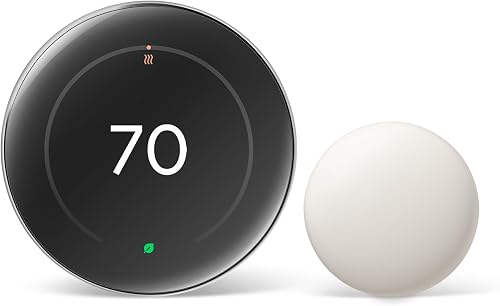
Google Nest Learning Thermostat (4th gen)
Best for: Google Home households who want a thermostat that sets itself.
- Learns schedules if you do not want to program one
- Remote sensor included
- Premium price
- Best experience inside the Google Home app
Name, photo and listed features checked on Amazon.com on November 14, 2026. We have not tested it; see how we choose.
In short: To build a Google Home setup, pick the device that will act as your hub first. For Wi-Fi devices any recent Nest speaker or display is enough; for Matter devices that use Thread, you need a Google device that works as a Thread border router. Then add devices one room at a time and set up presence sensing last.
Google Home works with thousands of devices through cloud integrations and, increasingly, through Matter. Several Nest speakers, displays and streaming devices act as Matter hubs, and some are Thread border routers.
Automations can use presence sensing from phones and devices; they are flexible but depend on location settings for everyone in the household.
Where to start with Google Home
- Check your hub. Wi-Fi devices linked through their maker’s cloud only need the Google Home app. Matter devices need a Google device that acts as a Matter hub, and Thread devices need one that is also a Thread border router; see which Google devices are hubs.
- Create the home and invite the household. Each adult should join with their own Google account so presence, voice match and permissions work per person.
- Pair Matter devices with the code. Scan the QR code or type the setup number from the device or its box; keep a photo of it for re-pairing.
- Group by room before you write any automation.
The Google Home starter kit gives a first list with prices.
Automations: starters, conditions and actions
Google Home automations follow a simple pattern: a starter (a time, sunrise or sunset, a voice phrase, a device changing state, or the household arriving or leaving), optional conditions, then actions. A useful first set: lights to 30% at sunset, everything off when the last person leaves, and a door sensor that announces when the back door opens at night.
Presence-based starters work only if every member enables location sharing for the home in the app; one phone with location off can keep the house in “home” mode. Our presence sensing guide covers the fixes, and routine ideas lists more. For complex logic, Google also offers a script editor for advanced users.
Cameras, history and fees
Google sells a subscription that extends camera and doorbell video history and adds features; without it, recorded history is shorter. Plan names and prices change, so check the current terms before you count on a feature. Video stays in Google’s cloud, so review who in the household can view it and how long it is kept. If you want no monthly fee, compare with locally recording devices in our doorbell without a subscription guide. Voice and audio settings are covered in the speaker privacy guide.
Kits 1
Guides 3
 GuideGoogle Home Matter hubs: which devices work and which add ThreadGoogle lists speakers, displays, a TV streamer and a Wi-Fi router as Matter hubs, but only some are Thread border routers. Learn what each hub does…
 GuideGoogle Home presence sensing: how “home” and “away” workGoogle Home can tell when you are home or away from phones, Wi-Fi and device activity, then run automations. Learn how it decides, how to set it…
 GuideWhich smart thermostat works with Alexa, Google Home and Apple Home?Check three things in this order: your HVAC wiring, whether the thermostat speaks Matter or supports your ecosystem, and which features need an…
Comparisons 2
 ComparisonAlexa vs Google Home: which ecosystem fits your householdBoth control lights, locks and thermostats by voice. They differ on built-in Zigbee, Matter hubs, presence automations and privacy settings. This…
 ComparisonApple Home vs Google Home: iPhone, Android, hubs and camerasApple Home and Google Home both support Matter, but they differ on phones, hubs, cameras and where data is processed. See which one fits your…
Frequently asked questions
Do I need a Nest speaker or display to use Google Home?
Not for every device. Wi-Fi devices linked through their maker’s cloud work with the app alone. Matter devices need a Google device acting as a Matter hub, and Thread devices also need a Thread border router.
Can Google Home and Alexa control the same device?
Yes, if the device supports Matter. Matter multi-admin lets you add one device to two ecosystems from the first app’s sharing menu. Cloud-linked devices can usually be added to both through each maker’s integration. See Matter multi-admin.
Which Google device does what
| Role | What it means | Read more |
|---|---|---|
| Voice and routines | Any Nest speaker or display | Routine ideas |
| Matter over Thread | A Google device that is a Thread border router | Google Home Matter hubs |
| Home and away | Phones, and on some devices presence sensing | Presence sensing |
| Choosing an ecosystem | Google, Alexa or Apple | Alexa vs Google Home |
Common mistakes
- Buying Thread devices before checking that one of your Google devices is a border router.
- Expecting Google Home to talk to Zigbee devices directly: it needs the maker's bridge, or a Matter version of the device.
- Letting home/away rely on one phone: add every household member, or the house may switch to away while someone is still inside.
More questions
Do I need a hub for Google Home?
Not for Wi-Fi devices that support Google Home. Matter devices over Thread need a Thread border router, which some Nest displays and routers provide.
Why does Google Home think nobody is home?
Presence usually relies on each person's phone location. Check that every household member is added, that location access is allowed in the background and that battery saver is not blocking the app.
Can Google Home and Apple Home control the same device?
Yes for Matter devices, thanks to multi-admin: one device can be added to several apps. See Apple Home vs Google Home.
Read next
Sources
- Amazon.com listing: Google Nest Learning Thermostat (4th gen) + Nest Temperature Sensor (2nd gen) - Silver (ASIN B0D5BGST5N), checked November 14, 2026
Product names, photos and listed features were checked on the Amazon.com product pages on November 14, 2026. Prices and availability change; the retailer page is always the reference.