Smart living room
Lighting scenes, motorized shades, ceiling fans, TV privacy settings and voice control: how to make the room you use most easier to live in.
As an Amazon Associate we earn from qualifying purchases. Product links on this page are affiliate links: buying through them costs you nothing extra and does not change what we recommend.
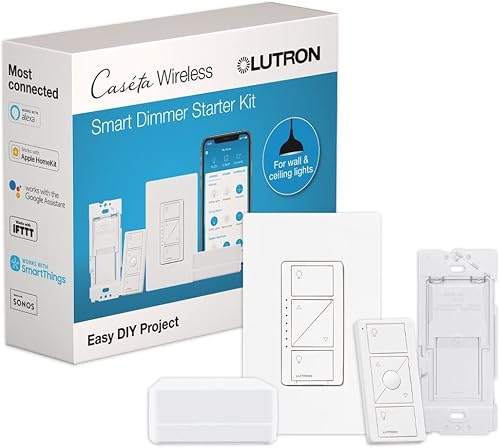
Lutron Caséta smart dimmer starter kit
Best for: Older homes without neutral wires in the switch box, and anyone who wants a smart switch that guests can use like a normal one.
- Caséta dimmers do not need a neutral wire, the usual blocker in older homes
- Very reliable because switches do not depend on Wi-Fi
- Needs the Lutron hub for app and voice control
- Check the dimmer’s LED load rating and compatible bulbs
Name, photo and listed features checked on Amazon.com on November 14, 2026. We have not tested it; see how we choose.
In the living room, the goal is fewer remotes and fewer trips to the wall switch. Smart lighting and shades do most of the work; a voice assistant or a wall-mounted button ties them together so guests are not forced to use an app.
This is also where privacy questions start: smart TVs can track what you watch, and speakers with microphones sit in the middle of family life. Our pages explain the settings to change and which devices need a hub or a specific ecosystem before you buy.
Where to start in a living room
Begin with the lights you switch every evening, not with the ceiling fixture you rarely touch. A typical first week looks like this:
- Day 1: a smart bulb or plug on the two lamps you use most, grouped as one room in your assistant.
- Day 2: a wireless scene button by the sofa for “evening” and “off”, so guests never need the app.
- Day 3: a smart power strip on the TV stand, if the measured standby draw justifies it.
- Later: shades or a smart dimmer for the overhead light, which may involve wiring.
If you are unsure whether bulbs, strips or switches fit your room, read which smart lighting suits a living room before buying anything. Our living room kit stays plug-in only, so it also works for renters.
Make it work for guests and family
A living room setup fails the first time a visitor flips the wall switch and every smart bulb drops offline. A few habits prevent that:
- Protect switched bulbs. If a smart bulb sits on a wall switch, add a switch guard or replace the switch with a smart one; see smart bulbs vs smart switches.
- Name devices the way people talk. “Sofa lamp” and “reading lamp” work by voice; “Plug 2” does not.
- Keep one non-voice control. A button or the original remote helps anyone who does not want to speak to a speaker.
- Use rooms and groups. “Turn off the living room” should switch everything at once, including the TV strip.
Standby power and the TV stand
Consoles, soundbars, set-top boxes and some TVs draw power all day while “off”. The math is simple: 10 W of standby runs 8,760 hours a year, or about 88 kWh, roughly $15 a year at 17 cents per kWh. A stack drawing 30 W costs three times that. Measure first with an energy-monitoring plug, then decide; our standby savings calculator does the arithmetic.
Leave some devices powered. A DVR or cable box may lose its guide or miss recordings, a game console may skip overnight updates, and some TVs reset settings after a hard power cut. Put those on the strip’s always-on outlets.
Kits 1
Guides 7
 GuideWhich devices use the most standby power at homeStandby power is electricity a device uses while “off” or idle. Learn which categories of devices draw the most, how to measure yours, and which to…
 GuideHow to make a ceiling fan smartLearn the three ways to add smart control to a ceiling fan, why a light dimmer is the wrong switch and how to check your wiring before you buy.…
 GuideTurn off smart TV tracking (ACR)Many smart TVs use automatic content recognition to log what is on your screen and sell the data to advertisers. Here is what ACR is and how to…
 GuideCordless and smart shades for child safetyWindow cords are a known strangulation hazard for young children. Learn what cordless really means, how to check blinds you already have and what to…
 GuideSmart bulbs for recessed lights: sizes, fixtures and optionsRecessed cans take BR30, BR20 or PAR bulbs, or an LED retrofit module. Learn which smart bulb shape fits, why the can matters, and when a smart…
 GuideWhich appliances can go on a smart plug, and which cannotLamps, fans and holiday lights suit a smart plug. Refrigerators, space heaters and medical devices do not. Check wattage, device type and failure…
 GuideWhich smart lighting to choose for your living roomMost living rooms use lamps, one ceiling fixture and a TV. The right smart lighting depends on what you already own, whether you rent, and what mood…
Comparisons 2
ComparisonMotorized shades vs retrofit blind motorsMotorized shades replace the window covering; a retrofit motor adds a drive to the blind you have. Compare price, installation, renting, power, noise… ComparisonSmart plugs or a smart power strip: which suits a living roomA smart plug controls one device. A smart power strip controls several outlets, often with surge protection. Here is how to pick for a TV stand…
Frequently asked questions
Do smart bulbs work with a dimmer switch on the wall?
Usually not well. A wall dimmer reduces the power reaching the bulb, which can make a smart bulb flicker, buzz or drop its connection. Leave the dimmer at full, or swap it for a smart dimmer with regular dimmable LEDs; see smart dimmer vs smart switch.
Sources
- Amazon.com listing: Lutron Caseta Smart Dimmer Starter Kit w/ 1 OG Dimmer, Pico, Bracket & Hub (ASIN B07G5V6M6G), checked November 14, 2026
Product names, photos and listed features were checked on the Amazon.com product pages on November 14, 2026. Prices and availability change; the retailer page is always the reference.