Robot vacuum upkeep kit
The small purchases that keep a robot vacuum cleaning: spare filters and brushes, boundary strips, cord control and sensor-cleaning supplies, with prices and what to check.
As an Amazon Associate we earn from qualifying purchases. Product links on this page are affiliate links: buying through them costs you nothing extra and does not change what we recommend.
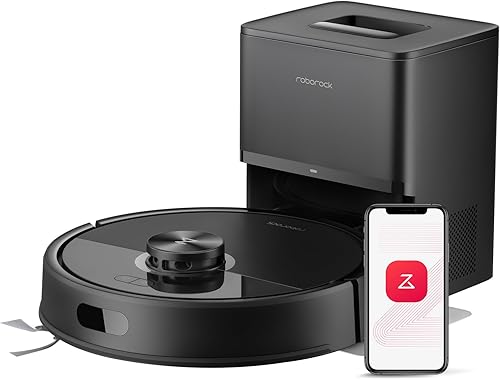
roborock Q7 M5+ robot vacuum and mop
Best for: Small apartments and homes with pets where daily vacuuming matters.
- Self-empty dock suits busy households and pet hair
- Vacuums and mops
- The dock needs floor space and an outlet
- Replacement bags are an ongoing cost
Name, photo and listed features checked on Amazon.com on November 14, 2026. We have not tested it; see how we choose.
Before you buy
Most robot vacuum problems come from tangles, dust on sensors and worn parts, not from the robot itself. A small kit solves these before they start, and most items are model-specific, so check your robot’s exact model number first.
Parts and consumables: check the model number
Filters, brushes, bags and mop pads rarely fit across brands or even across generations of the same line. Find the model number on the underside of the robot or in the app, and compare it to the listing’s compatibility list before you order. The maker’s manual usually gives a replacement schedule: filters often need washing every couple of weeks and replacing every few months, depending on use.
Before the first run
- Pick up cords, socks, charging cables and loose fringe. Clip cables along baseboards.
- Place physical boundary strips across rooms or around items you do not want the robot to approach, such as pet bowls, plant stands and doorways with thick rugs.
- Check for thresholds taller than the robot’s listed climb height and add a ramp or close the door.
- Clean the dock’s charging contacts and the robot’s cliff sensors with a dry microfiber cloth.
Account and privacy basics
The robot connects to an app and a cloud account, and many models store a map of your home. The FTC advises changing default passwords, using a strong, unique password and two-factor authentication where offered, and keeping firmware and the app up to date. Review the app’s privacy settings, turn off features you do not use and remove old devices from your account.
Running cost of the dock
The Department of Energy’s formula is watts × hours ÷ 1,000. As an illustration, a dock that draws 5 W around the clock uses 0.12 kWh a day, about 44 kWh a year, which is roughly $8 at 18¢ per kWh. The EIA forecasts about 18.2¢ for 2026, but your own rate may differ. A plug-in power meter shows the actual draw.
Core items
The washable filter and side brushes wear out first. A spare set means you can swap and keep cleaning while the old filter dries.
What to look for: made for your exact robot model, includes filters, side brushes and sometimes a main brush, multi-pack
Charging cords and thin cables are what a robot most often gets tangled in. Clip or sleeve them off the floor along baseboards.
What to look for: adhesive cord clips or a cable sleeve, removable without paint damage for renters, enough length for the room
A flexible strip across a doorway or around a pet bowl keeps the robot out, even when its app or sensor map fails.
What to look for: compatible with your robot’s sensors, flexible, adhesive that is safe for floors, long enough to cut

Dust on cliff sensors, bumper sensors and the charging contacts can make a robot misread edges or fail to dock. Wipe them every couple of weeks.
What to look for: lint-free microfiber, a small soft brush, a pack that lasts for months
Nice to have
Only if your robot has a self-emptying dock. A multi-pack lasts months, and a full pack avoids a stop-start cleaning schedule.
What to look for: exact fit for your dock’s model number, filter included, multi-pack
If your robot mops, reusable pads cost less over a year than disposable ones and are easy to wash.
What to look for: made for your exact robot, machine washable, multi-pack
A low ramp helps the robot across a raised door track so it can clean more rooms without getting stuck.
What to look for: height that matches your threshold, flexible rubber, an adhesive safe for floors
Adds a physical barrier at the top of an open staircase in case the cliff sensors misread a dark edge.
What to look for: fits your opening, walk-through door, no drilling for renters
Step by step
- Find your robot’s model number and write it on the inside of a cupboard door or in your phone, so you order matching parts.
- Walk the floor and clip or sleeve loose cords. Move small items off the floor.
- Lay the boundary strips, press the adhesive down and test with a short run.
- Wipe the cliff sensors, bumper sensors and charging contacts with a dry cloth.
- Empty the bin and wash the filter if the maker allows it; let it dry fully before reinstalling.
- Remove hair from the brushes with scissors or a small brush; check for wrapped fibers at the bearings.
- Set a reminder to repeat this every two weeks, and replace filters and brushes on the maker’s schedule.
Cheaper or upgraded versions
Add boundary strips only if the robot keeps going where you do not want it.
If you are still choosing a robot, read which robot vacuum for a multi-floor home or self-emptying vs manual-bin first.
Frequently asked questions
How often should I replace robot vacuum filters and brushes?
Follow your model’s manual. As a rule, wash the filter every couple of weeks if the maker allows it and replace filters and side brushes every few months. Heavy shedding or a big home means more often.
Can I use third-party parts in my robot vacuum?
Often they fit if the listing names your exact model, but check the return policy and your warranty. A part that is slightly off can reduce suction or jam a motor.
What keeps a robot out of one area without the app?
A physical boundary strip or a closed door. Apps and virtual walls help, but a strip works if the map is lost or the app fails.
Why does my robot keep getting stuck on cables?
Thin cables and cords wrap around the brushes and wheels. Clip them along baseboards or sleeve them, and pick up the rest before each run. Our small apartment guide has more placement tips.
Sources
- Federal Trade Commission — Securing your internet-connected devices at home
- U.S. Department of Energy, Energy Saver — Estimating appliance and home electronic energy use
- U.S. Energy Information Administration — Short-Term Energy Outlook: electricity
- Amazon.com listing: roborock Q7 M5+ Robot Vacuum and Mop, Up to 7-9 Weeks Self-Empty, 10000Pa (ASIN B0DWX69JVG), checked November 14, 2026
Product names, photos and listed features were checked on the Amazon.com product pages on November 14, 2026. Prices and availability change; the retailer page is always the reference.
Related pages
 ComparisonSelf-emptying dock or manual bin: which robot vacuum fits you?A self-emptying dock empties the dustbin for you but adds cost, bags and bulk. A manual bin is simpler and cheaper. See which one fits your floors…GuideRobot vacuum for pet hair: what to look forPet hair tangles brushes, fills small bins and spreads when a robot meets an accident. Check brush design, bin size, filter and obstacle detection…GuideRobot vacuum for a small apartment: size, noise and dockA small apartment needs a robot that fits under furniture, docks in a tight spot and runs without annoying neighbors. Here are the measurements and…GuideRobot vacuum cameras and privacy: settings to checkSome robot vacuums use cameras to avoid obstacles. Before you enable one, learn what the images are used for, where they go and which settings and…GuideWhich robot vacuum for a multi-floor home?A robot vacuum cannot climb stairs, so a two-story home means carrying one robot, buying two or choosing a model that remembers each floor. Here is…
 GuideMotion sensors and pets: how to avoid false alarmsPet-immune motion sensors, higher mounting and perimeter-first alarms can keep a cat or dog from setting off your system. What works, what does not…